

This guide is in English for now. The tool itself works in your language.
My data › Help › Businesses, parties and items
Customers and suppliers
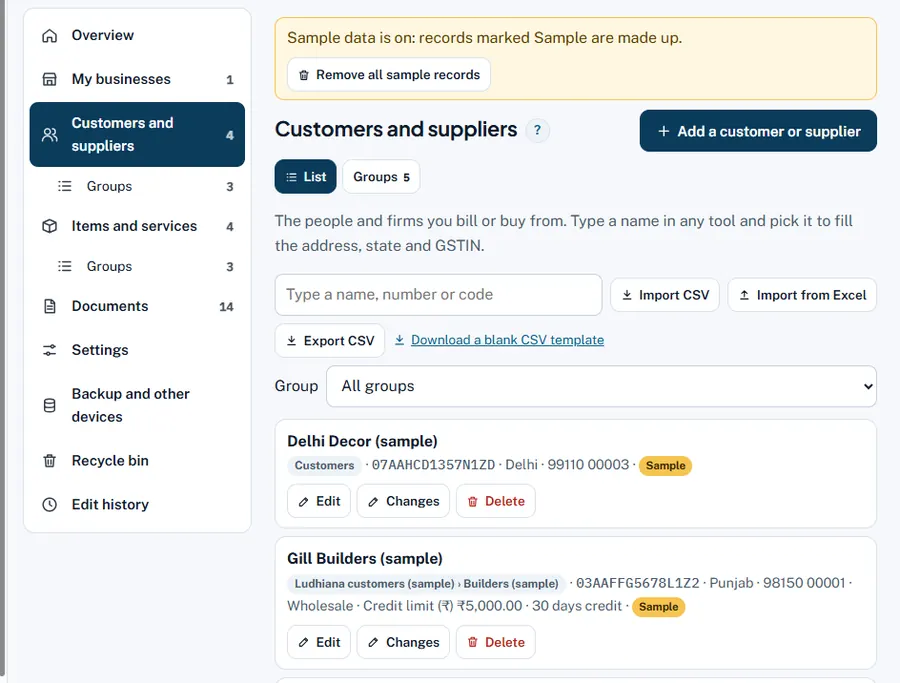
Every person or firm you bill or buy from. Add them once; in any tool, type a few letters of the name and pick it to fill the address, state and GSTIN.
Step by step
- Open Customers and suppliers. In My data press Add a customer or supplier.
- Type and Group. Type: customer, supplier or both. Group: pick one or choose a new group name.
- Name * and contact. Phone, Email.
- GST and address. GSTIN (if registered), State, Address, City / town, PIN code. If goods go elsewhere, fill Ship to address and Ship to state.
- Selling terms. Price type (retail or wholesale rate on bills), Credit limit (₹) and Credit days.
- Save. Search, filter by Group, and use Edit, Changes (its edit history) or Delete.
Worked example
Gill Builders: Customer, group Builders, GSTIN 03AAFFG5678L1Z2, Punjab, price type Wholesale, credit limit ₹5,000, credit days 30. Their bills then use the wholesale rate, become past due 30 days after the bill date, and Dues shows "Over credit limit" when they owe more than ₹5,000.
Common mistakes and how to fix them
- Wrong state for a registered customer. The first two digits of the GSTIN are the state code; the state decides CGST + SGST or IGST.
- Same customer twice ("Gill Builders" and "Gill Builder"). Balances split. Rename one and move its bills, or merge them.
Try it now: it is free and needs no login.Open My data
Related help
Groups of parties and itemsGroups sort your parties and items, like "Retail customers", "Ludhiana route" or "Paints". Reports then add them up…Import from ExcelStarting with hundreds of items or customers? Fill one Excel file and import it. You see every row, with any problem,…Dues and WhatsApp remindersThe Dues screen lists every customer who owes you (and, under To pay, every supplier you owe), split by how old the…Party ledger and statementEvery customer and supplier has a ledger: every bill, payment, note and journal entry with a running Dr/Cr balance.…