

This guide is in English for now. The tool itself works in your language.
My data › Help › Businesses, parties and items
What My data is, and how the tools use it
Every Nivesh Sahayak tool (billing, quotation, receipt, the App and the rest) reads and writes one shared store in your browser, the data home. My data is the screen where you see and edit everything in it.
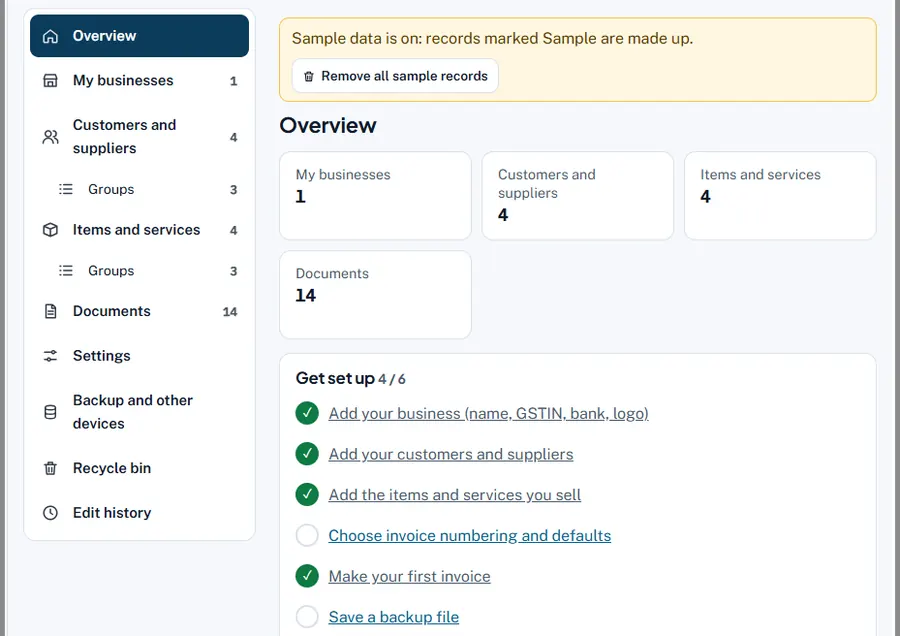
Step by step
- Open My data. Go to my.niveshsahayak.in, press My data at the top of any tool, or choose Settings and saved data in the App.
- Follow Get set up. The Overview shows how many businesses, customers and suppliers, items and documents you have, and a checklist: Add your business, Add your customers and suppliers, Add the items and services you sell, Choose invoice numbering and defaults, Make your first invoice, Save a backup file.
- Use the sections. My businesses, Customers and suppliers (with Groups), Items and services (with Groups), Documents, Settings, Backup and other devices, Recycle bin and Edit history.
- Open a tool from Tools that use this data. The overview lists every tool; they all see the same records.
Worked example
You add the customer "Gill Builders, Model Town, Ludhiana, GSTIN 03AAFFG5678L1Z2" once in My data. Next day, in the quotation maker, you type "Gil" and pick it: name, address, state and GSTIN fill in. The same happens in billing, challan, receipt and the App.
Common mistakes and how to fix them
- Expecting it online. My data is in this browser only, not on a server. Use a backup file to move it.
- Typing customers again in every tool. Not needed: start typing the name and pick the suggestion.
Try it now: it is free and needs no login.Open My data
Related help
My businessesThe business is the seller on your documents. Its name, address, GSTIN, bank details, logo and signature print on every…Customers and suppliersEvery person or firm you bill or buy from. Add them once; in any tool, type a few letters of the name and pick it to…Items and servicesGoods and services with their HSN/SAC code, unit, rates and GST. Pick one in any tool and the whole line fills in.Backup and restoreYour data lives only in this browser. One backup file holds every business, customer, supplier, item, document, money…