

This guide is in English for now. The tool itself works in your language.
My data › Help › Backup, auto save and moving
Back up and restore your data
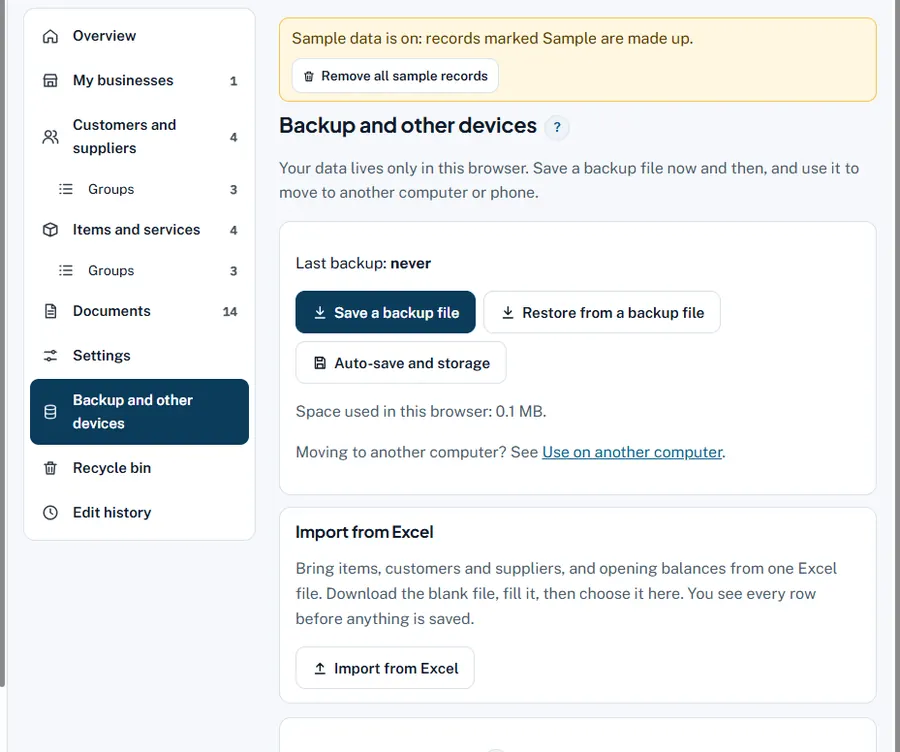
Your data lives only in this browser. One backup file holds every business, customer, supplier, item, document, money entry, stock record and setting. Save it often, keep it safe, and you can never lose your work.
Step by step
- Save a backup file. My data › Backup and other devices › Save a backup file (or My data › Save a backup file at the top of any tool). The file goes to your Downloads.
- Keep it safe. Copy it to a pen drive, Google Drive or send it to yourself on WhatsApp. Last backup shows the date.
- Restore. Press Restore from a backup file and choose the file. It says how many records came back; newer records you already had are kept.
- Locked backup (optional). Save a locked backup asks for a password; only that password opens it. Good for Google Drive or a shared computer.
Worked example
Every Saturday the shop saves a backup and sends it to the owner's own WhatsApp. When the shop computer's browser was reset, the owner opened my.niveshsahayak.in, pressed Restore from a backup file and chose last Saturday's file: "1,214 records brought back". Only the bills of that Monday had to be typed again.
Common mistakes and how to fix them
- Forgetting the locked backup password. It cannot be opened without it. Also keep a normal backup somewhere private.
- Restoring an old file over newer work. Safe: newer records are kept, older copies do not overwrite them.
Try it now: it is free and needs no login.Open My data
Related help
One auto save (computer only)On a computer, choose a folder once and every save, on any Nivesh Sahayak site or in the App, keeps one full backup…Move to a new computer or phoneBecause your data lives in one browser on one device, moving is a two-minute job with one backup file.Where your data is keptNothing you type is sent to us. All Nivesh Sahayak tools and the App keep your data in one place in your own browser,…